A Chrome & Edge extension
Your tabs, organised into Spaces.
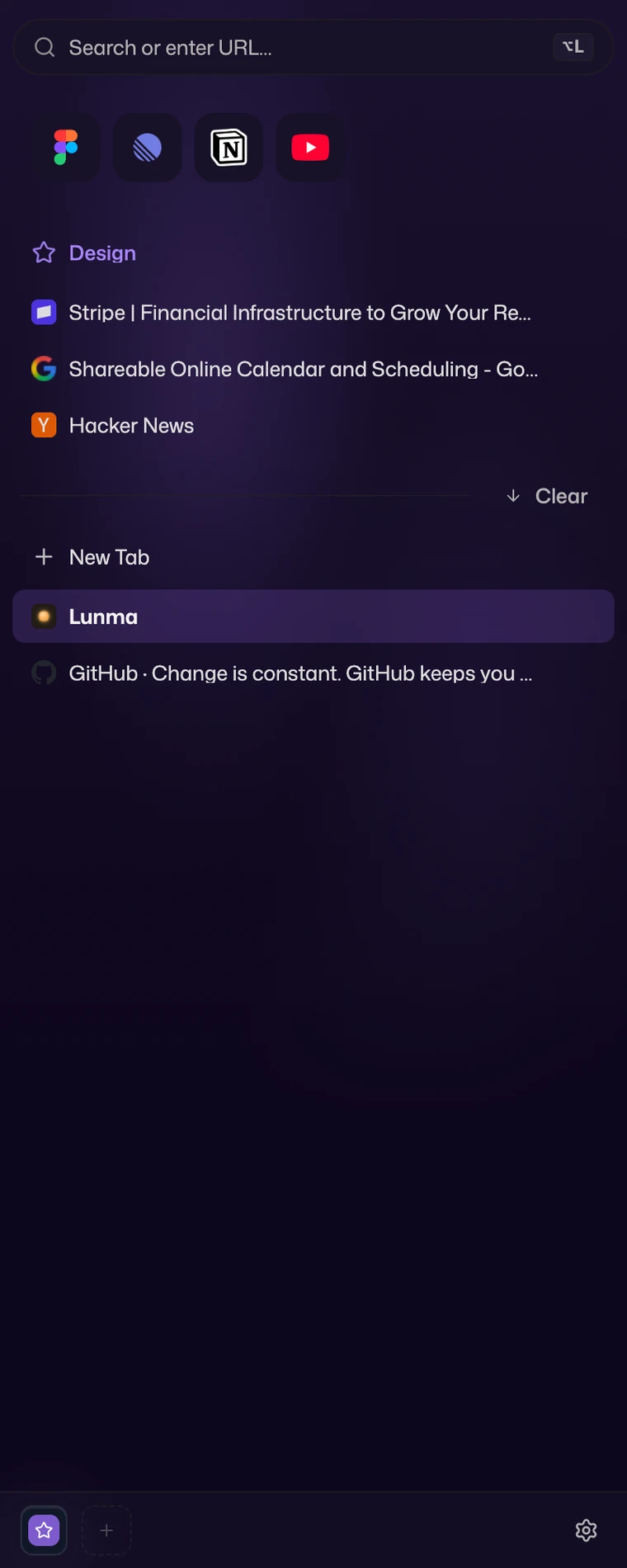
Lunma is a vertical sidebar for Chrome and Edge. Every project gets its own colour-coded Space, and the launcher on Alt L jumps you to any tab.
Free, and it never phones home.
Pick a Space — the sidebar and new tab recolour to match.
Spaces
Group tabs into colour-coded Spaces.
Make a Space for each thing you're juggling. Each one holds its own tabs in the order you left them, with a colour pulled from a palette of nine. Switch Spaces and the whole sidebar swaps to that work and recolours to match.
Launcher
Search everything from Alt+L.
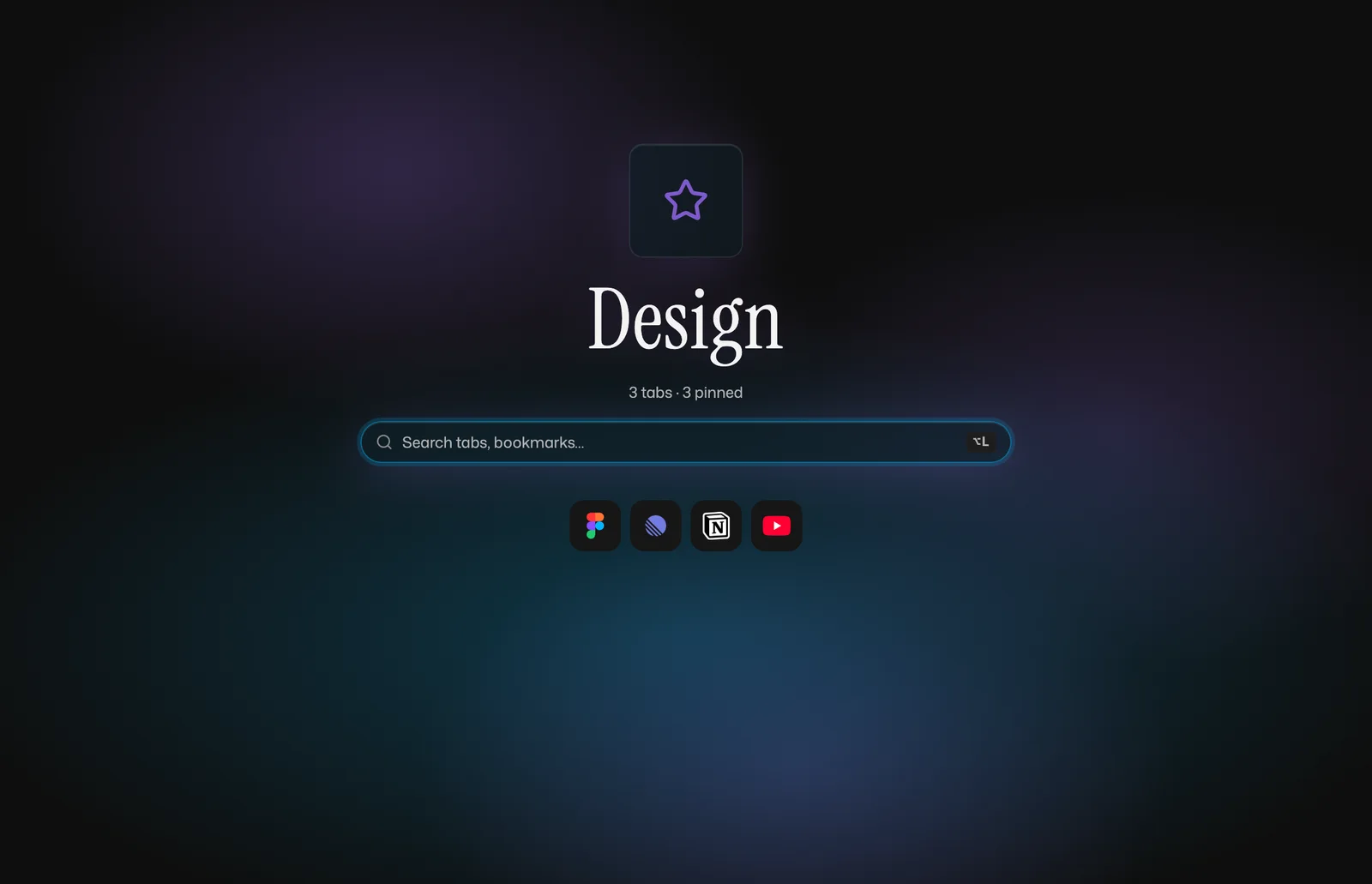
One overlay searches your open tabs, your bookmarks, and your history, from any page or the new-tab screen. Type a few letters, press Enter, and you're there. It runs web searches too, and a tap of Tab switches which engine answers: Google, DuckDuckGo, or one you set yourself.
Auto-archive
Idle tabs archive themselves.
The tabs you didn't pin slip into an archive once they've sat idle past a limit you choose. Nothing's deleted. The archive holds onto them, and you can pull any of them back later. Your list stays short without you tending it.
Favourites
Favourites, one click away in every Space.
Drag the sites you open all day up to the favourites row at the top of the sidebar. They stay put in every Space. Everything's saved locally and survives a restart.
Pinned tabs
Pinned tabs act like apps.
Pin a site and it acts like an app, not a bookmark. It holds its own page, and a link that heads somewhere else opens in a new tab next to it instead of dragging your pinned view along.
Smart folders
A folder that fills itself.
A smart folder fills itself from a service you keep checking, so you stop reopening the site to see what moved. Point one at a code host like GitLab or GitHub and the work waiting on you lands in your Space, kept current on its own. An issue tracker like Jira or an RSS feed you follow fills the same way. It works with your own self-hosted instance, and like everything in Lunma it stays on your device. There's no Lunma server behind it, and more connectors are on the way.
No mockups
This is the actual extension.
One live capture, straight from the browser — the sidebar open beside the new-tab page, exactly as you'll use them.
Coming from Arc
Arc's Spaces, in the browser you already use.
You came here from Arc, and you want what it did with Spaces. You can have that without changing browsers. Lunma puts a vertical, colour-coded sidebar inside the Chrome or Edge you already run, with the launcher a keystroke away. You won't learn a new browser or make an account. It's open source, and everything runs on the device in front of you. One Space can be open in as many windows as you've got.
Your data stays on your device
Your Spaces, favourites, and pinned tabs sit in your browser's local extension storage, on this device. Your settings ride your browser's own sync, so they follow your profile and nothing else does. There's no Lunma account and no Lunma server behind any of it.
Open source
The full source is public and Apache-2.0 licensed, and we build it in the open. Read exactly what it does, and the permissions it asks for, before you install.
Nothing is sent anywhere
Fonts and code ship inside the extension. Lunma makes no network calls of its own and no analytics calls. Unplug the network and it works exactly the same.
Questions
Does it change my browser?
No. It's an extension, so it adds its own surfaces: a vertical sidebar, a new-tab page, and the launcher on Alt+L. It can't repaint Chrome's own window or tab strip, and it doesn't try to. It sits on top of the browser you already have.
What happens right after I install?
Lunma opens in the browser's side panel and pulls your open tabs in. Any tab groups you already keep become Spaces; the rest land in a starter Space you can sort however you like. Press Alt+L to search from anywhere. There's nothing to set up.
What permissions does it ask for, and why?
Every permission earns its place. The launcher reads your tabs, bookmarks, and history so it can search them. Spaces ride on Chrome's own tab groups. Auto-archive needs an alarm to know when a tab has gone idle. And Lunma runs a small script on each page so the launcher and the pinned-tab behaviour work wherever you are. All of it reads locally. There's no telemetry and nothing goes to a Lunma server. A web search you run opens in whatever engine you picked, the same as typing in the address bar. The whole thing is public, so you don't have to take our word for any of it.
Where is my data stored?
On your device, and nowhere else. Your Spaces, pinned tabs, favourites, and settings sit in your browser's local extension storage. They're there after a restart, and none of it gets uploaded, because there's no Lunma server to upload to. The launcher can search the bookmarks you already have, but Lunma doesn't turn your Spaces or favourites into bookmarks.
Does it sync across my devices?
No. Everything Lunma keeps lives on the device you're using, and it's there after a restart. It won't follow you to your other machines, though.
What happens to my Spaces if I uninstall?
They live on your device, so removing Lunma clears them from that browser, and they don't travel to another machine on their own. (A backup-and-restore export is on the way for exactly this.) Your open tabs stay open either way, since they're ordinary browser tabs.
How is Lunma different from Arc?
Arc is a whole browser, with its own account and its own sync. Lunma is an extension, so you get Arc-style Spaces and a vertical sidebar without leaving the Chrome or Edge you already run. It's open source and fully local. There's no account, and your data never leaves the machine.
Is this like Arcify?
Arcify proved an Arc-style sidebar could live inside a Chrome extension, and we're grateful for the trail it cut. Lunma is built from scratch in that spirit, and it goes its own way in a few places: it's open source with no account to set up, and one Space can be open in several windows at the same time.
Does it work on Edge?
Yes. Edge is Chromium under the hood, so it's the same extension. You'll want Chromium 123 or newer.
Get started
Add Lunma to Chrome or Edge.
Free, local-only, and open source. Install it once, and your tabs settle into Spaces.